AI workflows: from first test to full AI integration

Skills are reusable AI workflows. An agent runs them in chat with the organization’s own data, and people approve the work at checkpoints.

AI workflows: from first test to full AI integration

Skills are reusable AI workflows. An agent runs them in chat with the organization’s own data, and people approve the work at checkpoints. I designed how a skill is triggered, tested it with client teams in three countries, and evolved the builder around AI with intent: the AI guides, explains and checks, while people stay in charge of every word, every review and every run.
Role
Product designer
platform
B2B AI SaaS platform
Duration
3 months
setting
Product, Engineering, Pilot users, C-suite

Product screens are under NDA

Have the password? Enter it to see the screens throughout this case study.

context & stakes

One person’s know-how, made the whole team’s

The platform is an AI-powered B2B SaaS product where marketing teams plan, collaborate and get work done with AI agents and their organization’s own data. Skills are reusable AI workflows inside it: someone describes what they need in chat, an agent runs the matching skill, and people approve the work at checkpoints.

Most teams repeat the same briefs, reports and analyses every week, and the steps live with a few people. I was the product designer on Skills for three months, working with another designer, Product, Engineering, pilot users and the C-suite.
business & user impact

Why it mattered

We designed for two people. The ambitious expert, a senior marketer, wants their best thinking to go further and to stay theirs. The quality guardian, a team lead, signs off on far more work than they can read closely. Neither wants a tool that does the work for them.
Save time
Work that took up to a week can take as little as two hours once the steps are saved as a skill.
Use fewer tokens
The instructions, data and output format are already in the skill, so there’s no back-and-forth of repeat prompts.
Keep work consistent
Every run follows the same steps and output format, whoever on the team runs it.
Keep know-how in the organization
An expert’s process stays with the team. Admins review it before it’s published, and it can improve over time.
problem & bet

Lots of skills, not always good ones

Before rolling Skills out to every client, teams ran co-working sessions in three countries. In two weeks, 487 client users built 1,493 skills for their own work. They were motivated by the output, and they showed what happens to a shared skill library at scale.
Session 1
137
skills created
120 people · about 1 each
Session 2
567
skills created
240 people · about 2 each
Session 3
789
skills created
127 people · about 6 each
In two weeks1,493 skills · 487 people · 3 countries
Each dot is about 10 skills.
The blank page
Every field started empty. People didn’t know what a good instruction or expected output looked like.
Duplication
Hundreds of skills in one session. Which ones repeat each other, and which produce the best output?
Writing for an agent
A skill needs precise direction, and splitting work into steps and dependencies was left to the builder.
the bet
Light AI suggestions sparked ideas even when people didn’t keep them. So we bet that an AI guide could help people build the whole skill, while they stay in control of every word.
constraints

What we had to design around

Every decision had to work inside the platform’s rules and the team’s capacity.
People stay in control
The AI never submits, approves or publishes a skill. Only an admin can publish.
Start small
Design favoured a stepped builder. Product and Engineering chose to ship a form with light AI help first.
No auto-save
Edits only reach others on save, so two co-authors could overwrite each other.
A layered access model
Company admins decide who is in the space. Library admins decide what gets published there.
three key decisions

Human-in-the-loop: AI with intent, not takeover

The goal was never to have the AI build skills for people. It was to help every builder make the best skill for their team.
decision 01

Rebuild the schema for running skills, not finding them

Another designer and I worked with Product for two weeks to define what a skill is. The first schema helped the agent decide when to use a skill. The co-working sessions showed finding a skill wasn’t the hard part; getting reliable output was. So the schema shifted to execution: a step-by-step instruction, every expected output, the data the skill connects to and how tasks depend on each other.
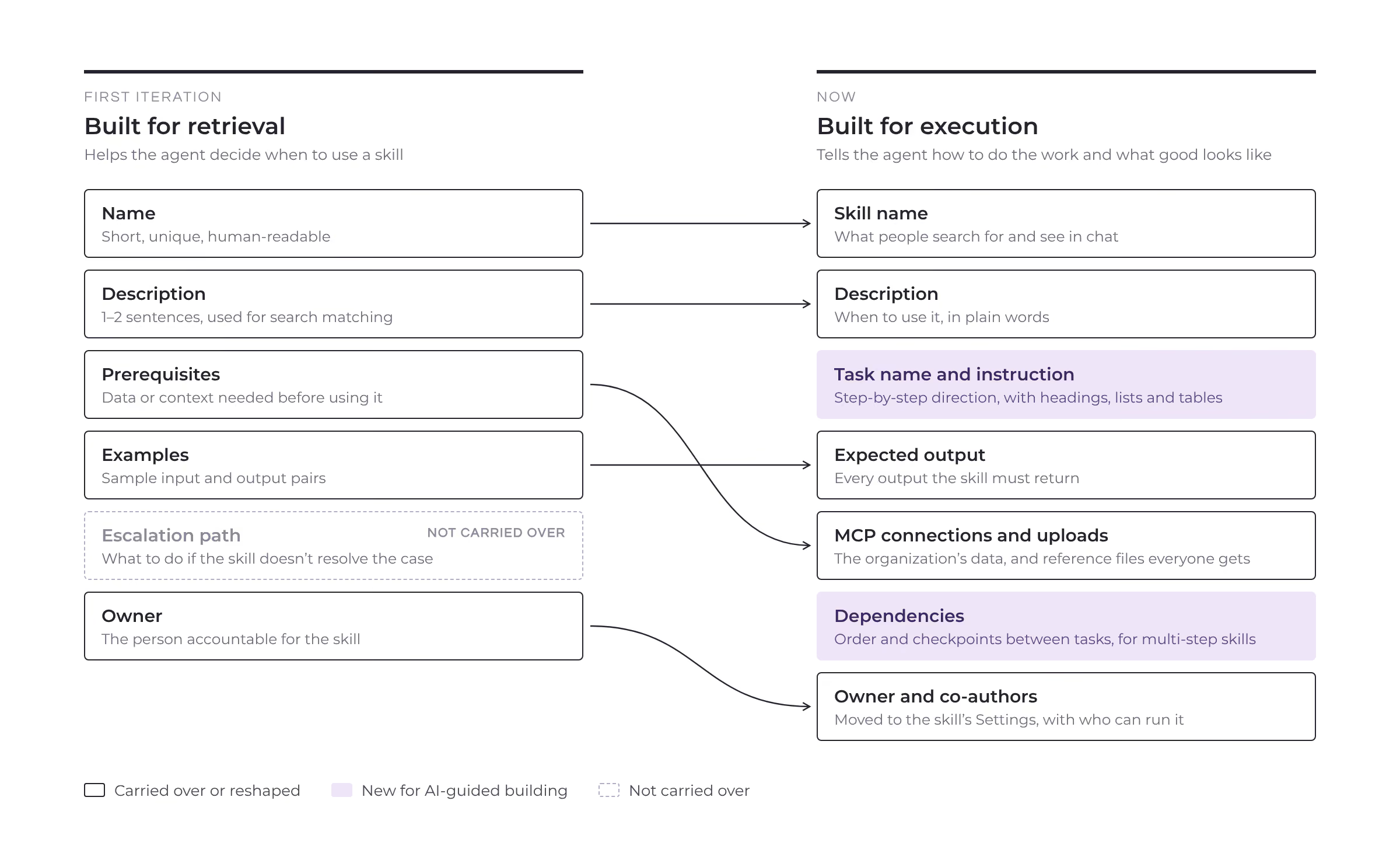
decision 02

Make the AI a guide, not a ghostwriter

Builders describe what their team needs in plain words. The AI drafts each field and explains why in the chat, points out gaps before the skill is submitted and flags when a similar skill already exists. Anything the AI writes stays marked until a person accepts or edits it, so it’s always clear who wrote what.
decision 03

Let teams build and run skills together

From one description, the AI proposes tasks, dependencies and a checkpoint, and the builder reshapes them. Co-authors edit the draft together: with no auto-save, a field locks only while someone has unsaved changes in it. In a run, each task goes to its owner and pauses at checkpoints for the right person to approve.
outcomes

8,630 skills published, with people in control

Client teams built and published skills for their own work, and admins got a clear basis for trust: every AI-written field is marked, and only people approve.
8,630
skills created and published since launch in May, by client teams for their own work
Up to 95%
less time per task: work that took up to a week can take as little as two hours
Up to 70%
fewer tokens per task than a back-and-forth of repeat prompts
what I’d do next

Prove value, not just volume

The co-working sessions proved people want to build skills. The next step is proving skills create value for each organization. Auto evaluation is part of that: it tests each skill on typical requests with the organization’s own data before anyone relies on it.
Time to first draft
From opening Create a Skill to saving a draft, with and without the AI’s guidance.
Approved first time
Share of skills approved without being sent back.
Reuse across teams
Runs of a skill by people other than its author.